Posts

Show color code in ms word document.

Image
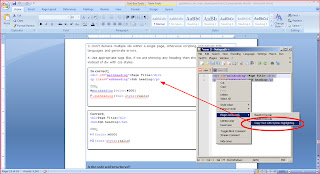
Download and install Notepad++ and do the following: Paste your code in the window; Select the programming language from the language menu; Select the text to copy; Right click and select Plugin commands -> Copy Text with Syntax Highlighting; Paste it into MS Word and you are good to go!

Access facebook profile picture publically

Image
If you are looking or want to use your current facebook profile picture in any other location and want to update automatically as you change the profile picture in facebook, you need to access the picture in following url format: Syntax : http://graph.facebook.com/ [your profile id] /picture?type=large For e.g my facebook profile id is "chandresh.kesri" so my image profile will be look like: Large:  http://graph.facebook.com/chandresh.kesri/picture?type=large http://graph.facebook.com/chandresh.kesri/picture?type=large Small : http://graph.facebook.com/chandresh.kesri/picture?type=small Normal :  http://graph.facebook.com/chandresh.kesri/picture?type=normal

Share any link with custom message on Facebbok

Image
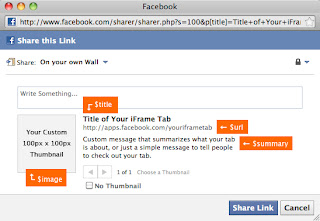
Facebook link sharing allows us to share any type of link with our custom message. use the below code to share your link: http://apps.facebook.com/itpotli/?ref=bookmarks < ?php $title=urlencode('Title of Your iFrame Tab'); $url=urlencode('http://apps.facebook.com/youriframetab'); $summary=urlencode('Custom message that summarizes what your tab is about, or just a simple message to tell people to check out your tab.'); $image=urlencode('http://www.yourdomain.com/images/share-thumbnail.jpg'); ? > < a onClick="window.open('http://www.facebook.com/sharer.php?s=100&p[title]=< ?php echo $title;? >&p[summary]=< ?php echo $summary;? >&p[url]=< ?php echo $url; ? >&&p[images][0]=< ?php echo $image;? >', 'sharer', 'toolbar=0,status=0,width=548,height=325');" target="_parent" href="javascript: void(0)" >Insert text or an image here. < /a >  Not...

PDF form validation using javascript

Step-1 - Go to Forms menu-   Choose Add or Edit fields Step-2 - Double click to open the dialogue box of Properties of the selected   Field. Step-3 - Tooltip- give the name here of the selected field and then * (for ex- Full Name*) then click on Close . [NOTE- Here this is compulsory to write the ‘*’ after the field name] This step will be done separately and repeated as same for all the fields in the form. Step-4 - Then select the button (Print button), right click on it. Step-5 -   Go to Action Tab- Delete the existing Action from the Actions , and Add an Action- ·       Select Trigger- Mouse up ·       Select Action- Run a JavaScript (from the dropdown arrow) ·       Then click on Add- (a dialogue box will be opened) Write here -    validateFields(); ·       Then click on OK. ·       Then close this box. Step-6 -   Now go ...

Interview questions and answers : JavaScript

What’s relationship between JavaScript and ECMAScript? - ECMAScript is yet another name for JavaScript (other names include LiveScript). The current JavaScript that you see supported in browsers is ECMAScript revision 3.  What are JavaScript types? - Number, String, Boolean, Function, Object, Null, Undefined.  How do you convert numbers between different bases in JavaScript? - Use the parseInt() function, that takes a string as the first parameter, and the base as a second parameter. So to convert hexadecimal 3F to decimal, use parseInt ("3F", 16);  What does isNaN function do? - Return true if the argument is not a number.  What is negative infinity? - It’s a number in JavaScript, derived by dividing negative number by zero.  What boolean operators does JavaScript support? - &&, || and !  What does "1"+2+4 evaluate to? - Since 1 is a string, everything is a string, so the result is 124.  How about 2+5+"8"? - Since 2 and 5 are in...
Solution : Php mail with attachment not sent using htmlMimeMail.php

If you are trying to sent mail with attachment using php, check the following things: [1]. Some times attachment is too much heavier to process so we need to set some settings on php initialization: add the following code on your mail sent page: < ? p h p ini_set ("memory_limit","24M"); ini_set ("upload_max_filesize","5M"); ? > [2]. Increase the localhost mail sent size: 1. Goto your IIS 2. Right click on " Default SMTP Virtual Server " 3. Choose " Properties " 4. Select " Access " tab -->" Connection control " --> Click on " Connection... " button --> check " All except the list below " --> "OK" 5. Select " Access " tab -->" Relay restrictions " --> Click on " Relay... " button --> check " All except the list below " --> " OK " 6.Select " Message " tab --> Increase...

Solution : Symantec Email Proxy Error from php mail

Image
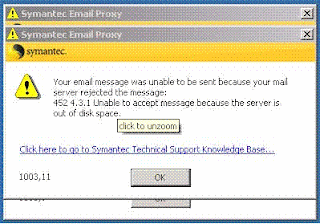
If you getting message like : "Your email message was unable to sent because your mail server rejected the sender." This message is appearing in my local machine when i am trying to send mail with attachment by using php. Solution:  1. Goto your IIS 2. Right click on " Default SMTP Virtual Server " 3. Choose " Properties " 4. Select " Message " tab 5. Increase the " Limit message size to (KB) " as your mail+attachment required. 6. Click on " Apply " then " OK ". 7. " Restart " your IIS. That's it.