Posts

Leap Year Calculator

Image
We know any year that is evenly divisible by 4 is a leap year : for example, 1988, 1992, and 1996 are leap years.  However, there is still a small error that must be accounted for. To eliminate this error, the Gregorian calendar stipulates that a year that is evenly divisible by 100 (for example, 1900) is a leap year only if it is also evenly divisible by 400.  For this reason, the following years are not leap years: 1700, 1800, 1900, 2100, 2200, 2300, 2500, 2600 This is because they are evenly divisible by 100 but not by 400.  The following years are leap years: 1600, 2000, 2400 This is because they are evenly divisible by both 100 and 400.  How to determine whether a year is a leap year To determine whether a year is a leap year, follow these steps: If the year is evenly divisible by 4, go to step 2. Otherwise, go to step 5. If the year is evenly divisible by 100, go to step 3. Otherwise, go to step 4. If the year is evenly divisible by 40...
ssl error in chrome, firefox and other browsers

Image
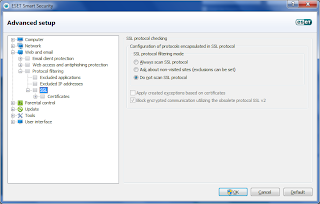
Hey Guys, If you are continuously getting ssl error issue during browsing with your regulaar websites like, facebook.com gmail.com yahoo.com etc etc then might be your antivirus making some issue. I am using ESET Smart Security 5 and i am also getting this ssl errorin all my browser... so i have setup this setting to overcome this issue. follow the step given below and resolve this issue : 1. Start ESET Smart Security 5 2. Click on Setup 3. Then click on Web and Email 4. Click on " Configure " 5. Expand " Web and Email " --> " Protocol Filtering " --> " SSL " --> 6. Choose " Do not scan SSL Protocols " and click " OK " button. View Fig 1 as shown below: Fig 1 - Resolve SSL Error Issue That's It, You Resolved the Issue...!!!

Check Chrome and Safari using jQuery

Use the following code: var userAgent = navigator . userAgent . toLowerCase (); $ . browser . chrome = /chrome/ . test ( navigator . userAgent . toLowerCase ()); // Is this a version of Chrome? if ( $ . browser . chrome ){ userAgent = userAgent . substring ( userAgent . indexOf ( 'chrome/' ) + 7 ); userAgent = userAgent . substring ( 0 , userAgent . indexOf ( '.' )); $ . browser . version = userAgent ; alert ( 'chrome' ); // If it is chrome then jQuery thinks it's safari so we have to tell it it isn't $ . browser . safari = false ; } // Is this a version of Safari? if ( $ . browser . safari ){ userAgent = userAgent . substring ( userAgent . indexOf ( 'safari/' ) + 7 ); userAgent = userAgent . substring ( 0 , userAgent . indexOf ( '.' )); $ . browser . version = userAgent ; alert ( 'safari' );

How to modify xml data using php - Part 2

Use the following code to update the submitted value from modify.php into xml: <?php function  update_book_id ( $id ,   $filename   =   'loaned.xml' ) { $data   =  simplexml_load_file ( $filename ); for ( $i   =   0 ,   $length   =  count ( $data -> resource -> book );   $i   <   $length ;   $i ++)      {      if ( $data -> resource -> book [ $i ]-> ID  ==   $id )          {                  $btitle   =   $_POST [ 'btitle' ];                   $bdate   =   $_POST [ 'bdate' ];          $bookrentdate   =   $_POST [ 'bookrentdate' ];          $...

How to modify xml data using php - Part 1

In modify.php add the following code: <?php $modifybook = $_GET [ 'bid' ]; $doc = new DOMDocument (); $doc -> load ( 'loaned.xml' );   $booklist = $doc -> getElementsByTagName ( "book" ); foreach ( $booklist as $book ) { $bookids = $book -> getElementsByTagName ( "ID" ); $bookid = $bookids -> item ( 0 )-> nodeValue ; if ( $bookid == $modifybook ){       $booktitles = $book -> getElementsByTagName ( "title" );       $booktitle = $booktitles -> item ( 0 )-> nodeValue ;       $dates = $book -> getElementsByTagName ( "date" );       $date = $dates -> item ( 0 )-> nodeValue ;             $retdates = $book -> getElementsByTagName ( "retdate" );       $retdate = $retdates -> item ( 0 )-> nodeValue ;       ...

How to delete xml node using php

Create delete.php file and add the following code <?php function delete_book_id ( $id , $filename = 'loaned.xml' ) { $data = simplexml_load_file ( $filename ); for ( $i = 0 , $length = count ( $data -> resource -> book ); $i < $length ; $i ++)     {     if ( $data -> resource -> book [ $i ]-> ID == $id )         {         unset ( $data -> resource -> book [ $i ]);         break ;         }     }     file_put_contents ( $filename , $data -> saveXML ());     echo $deletingbook . " Deleted !!!" ; } //SAMPLE USAGE $deletingbook = $_GET [ 'bid' ]; delete_book_id ( $deletingbook );  header ( "Location: {$_SERVER['HTTP_REFERER']} " ); //delete_book_id('Book 1'); ?>

How to add new content in XML using php

In index.php add the following form for inserting new data in xml using php <form action = "booklistaction.php" method = "post" >   <table>    <tr>        <td colspan = "2" class = "labelcell" ><label for = "btitle" > Book Title: </label></td>      <td colspan = "2" class = "fieldcell" ><input type = "text" id = "btitle" name = "btitle"   tabindex = "1" /></td>    </tr>       <tr>        <td colspan = "2" class = "labelcell" ><label for = "bdate" > Book Issue date: </label></td>      <td colspan = "2" class = "fieldcell" > <input type = "text" id = "bdate" name = "bdate"   tabindex = "2" /><br /> </td>    </tr>          <tr>    ...